Download FCP-FortiAnalyzer 7.4 Administrator.FCP_FAZ_AD-7.4.Actual4Test.2026-05-20.197q.vcex
| Vendor: | Fortinet |
| Exam Code: | FCP_FAZ_AD-7.4 |
| Exam Name: | FCP-FortiAnalyzer 7.4 Administrator |
| Date: | May 20, 2026 |
| File Size: | 14 MB |
How to open VCEX files?
Files with VCEX extension can be opened by ProfExam Simulator.
Discount: 20%


Demo Questions
Question 1
For which two purposes would you use the command set log checksum? (Choose two.)
- To help protect against man-in-the-middle attacks during log upload from FortiAnalyzer to an SFTP server
- To prevent log modification or tampering
- To encrypt log communications
- To send an identical set of logs to a second logging server
Correct answer: A, B
Explanation:
To prevent logs from being tampered with while in storage, you can add a log checksum using the config system global command. You can configure FortiAnalyzer to record a log file hash value, timestamp, and authentication code when the log is rolled and archived and when the log is uploaded (if that feature is enabled). This can also help against man-in-the-middle only for the transmission from FortiAnalyzer to an SSH File Transfer Protocol (SFTP) server during log upload.FortiAnalyzer_7.0_Study_Guide-Online page 149
Question 2
Which statement describes a dataset in FortiAnalyzer?
- They define the chart types to be used in reports.
- They are used to set the data included in templates.
- They determine what data is retrieved from the database.
- They provide the layout used for reports.
Correct answer: C
Question 3
What FortiGate process caches logs when FortiAnalyzer is not reachable?
- logfiled
- sqlplugind
- oftpd
- miglogd
Correct answer: D
Explanation:
The miglogd process on FortiGate is responsible for handling log forwarding and caching. When FortiAnalyzer is unreachable, miglogd temporarily stores logs in a local cache until the connection is restored.This prevents log loss during temporary network interruptions or FortiAnalyzer outages.Reference: https://forum.fortinet.com/tm.aspx?m=143106
Question 4
View the exhibit:
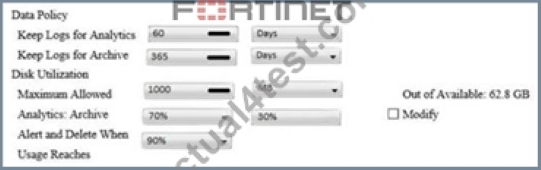
What does the 1000MB maximum for disk utilization refer to?
- The disk quota for the FortiAnalyzer model
- The disk quota for all devices in the ADOM
- The disk quota for each device in the ADOM
- The disk quota for the ADOM type
Correct answer: B
Explanation:
https://docs.fortinet.com/document/fortianalyzer/6.2.0/administration-guide/743670/configuring-log-storage-policy
Question 5
The admin administrator is failing to register a FortiClient EMS on the FortiAnalyzer device.
What can be the reason for this failure?
- FortiAnalyzer is in an HA cluster.
- ADOM mode should be set to advanced, in order to register the FortiClient EMS device.
- ADOMs are not enabled on FortiAnalyzer.
- A separate license is required on FortiAnalyzer in order to register the FortiClient EMS device.
Correct answer: C
Explanation:
Reference: https://help.fortinet.com/fa/faz50hlp/56/5-6-2/FMG-FAZ/0800_ADOMs/0015_FortiClient%20and%20ADOMs.htm
Question 6
Refer to the exhibit.
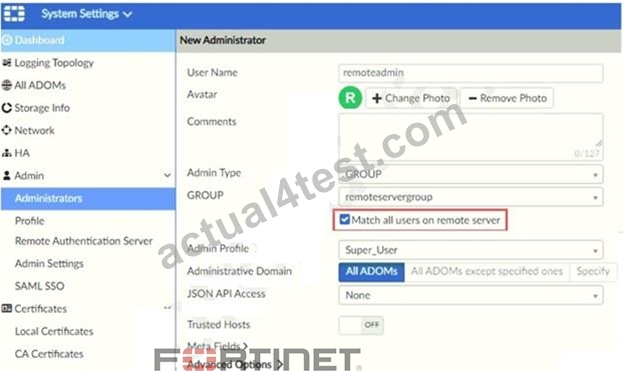
The exhibit shows "remoteservergroup" is an authentication server group with LDAP and RADIUS servers.
Which two statements express the significance of enabling "Match all users on remote server" when configuring a new administrator? (Choose two.)
- Administrator can log in to FortiAnalyzer using their credentials on remote servers LDAP and RADIUS.
- It allows administrators to use two-factor authentication.
- Use remoteadmin from LDAP and RADIUS servers will be able to log in to FortiAnalyzer at anytime.
- It creates a wildcard administrator using LDAP and RADIUS servers.
Correct answer: A, D
Question 7
After you have moved a registered logging device out of one ADOM and into a new ADOM, what is the purpose of running the following CLI command?
execute sql-local rebuild-adom
- To reset the disk quota enforcement to default
- To remove the analytics logs of the device from the old database
- To migrate the archive logs to the new ADOM
- To populate the new ADOM with analytical logs for the moved device, so you can run reports
Correct answer: D
Explanation:
FortiAnalyzer_7.0_Study_Guide-Online.pdf page 128: Are the device analytics logs required for reports in the new ADOM? If so, rebuild the new ADOM database
Question 8
How can you configure FortiAnalyzer to permit administrator logins from only specific locations?
- Use static routes
- Use administrative profiles
- Use trusted hosts
- Use secure protocols
Correct answer: C
Explanation:
https://docs.fortinet.com/document/fortianalyzer/6.2.5/administration-guide/186508/trusted-hosts
Question 9
For which two SAML roles can the FortiAnalyzer be configured? (Choose two.)
- Principal
- Service provider
- Identity collector
- Identity provider
Correct answer: B, D
Explanation:
Reference:20the%20identity%20provider%20(IdP,external%20identity%20provider%20is%20available.https://docs.fortinet.com/document/fortianalyzer/6.2.0/administration-guide/981386/saml-admin-authentication In FortiAnalyzer, SAML can be enabled across all Security Fabric devices, enabling smooth movement between devices for the administrator by means of single sign-on (SSO).FortiAnalyzer can play the role of the identity provider (IdP), the service provider (SP), or Fabric SP, when an external identity provider is available.FortiAnalyzer_7.0_Study_Guide-Online pag. 48
Question 10
A play book contains five tasks in total. An administrator executed the playbook and four out of five tasks finished successfully, but one task failed. What will be the status of the playbook after its execution?
- Success
- Failed
- Running
- Upstream_failed
Correct answer: B
Explanation:
Playbook jobs that include one or more failed tasks are labeled as Failed in Playbook Monitor.FortiAnalyzer_7.0_Study Guide page No: 247Playbook jobs that include one or more failed tasks are labeled as Failed in Playbook Monitor. A failed status, however, does not mean that all tasks failed. Some individual actions may have been completed successfully.
Question 11
Refer to the exhibit.
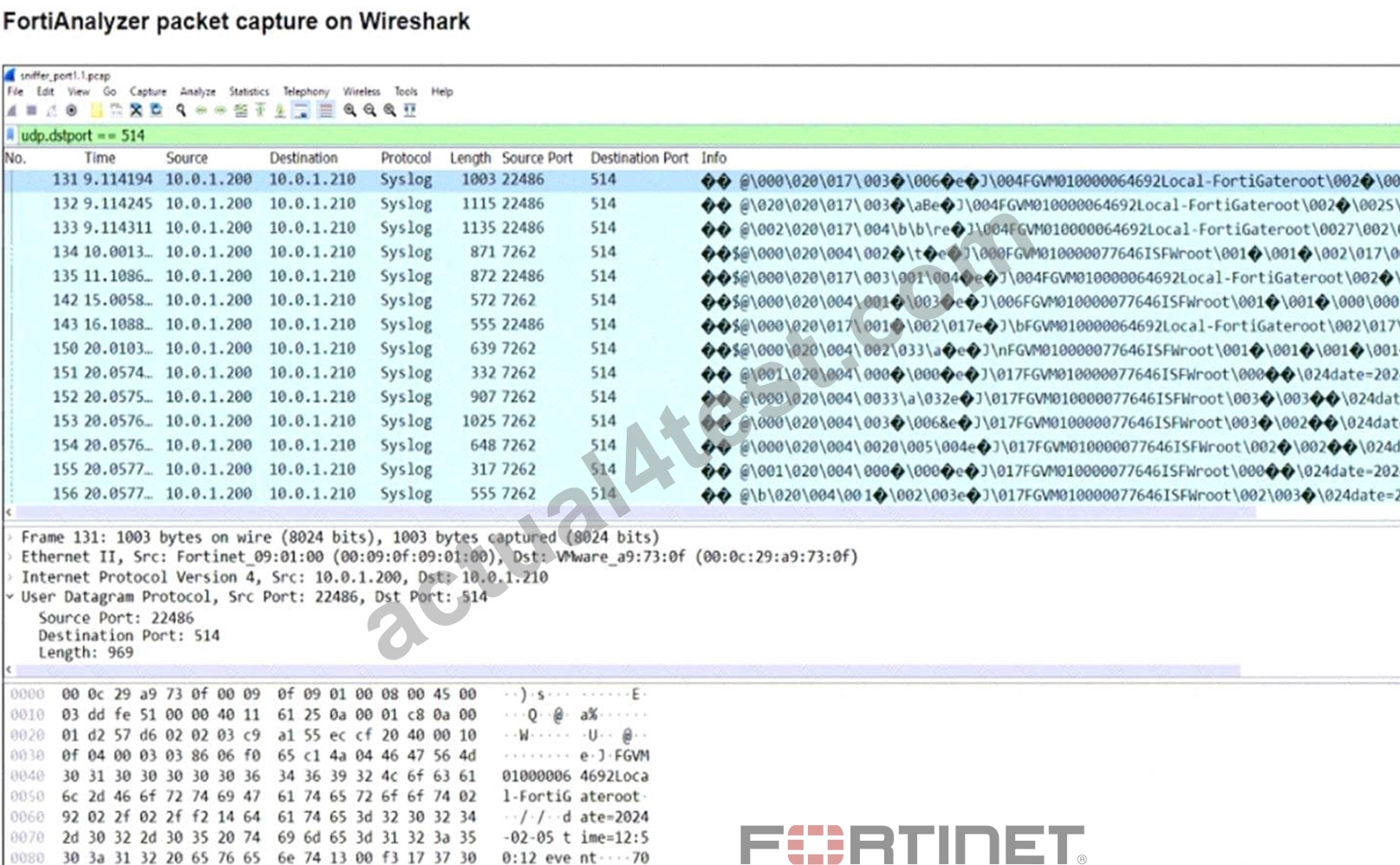
The capture displayed was taken on a FortiAnalyzer.
Why is a single IP address shown as the source for all logs received?
- FortiAnalyzer is using the device MAC addresses to differentiate their logs.
- The logs belong to devices that are part of a high availability (HA) cluster.
- FortiAnalyzer is receiving logs from the root FortiGate of a Security Fabric.
- The device sending logs has two VDOMs in the same ADOM.
Correct answer: C
Explanation:
In a Fortinet Security Fabric, logs from downstream devices can be sent to FortiAnalyzer through the root FortiGate. This is why all the logs have the same source IP address (the root FortiGate). The root FortiGate aggregates and forwards the logs from all downstream devices, so the source IP in the log capture will appear to be from the root FortiGate itself, even though the logs originate from multiple devices within the fabric.
HOW TO OPEN VCE FILES
Use VCE Exam Simulator to open VCE files
HOW TO OPEN VCEX AND EXAM FILES
Use ProfExam Simulator to open VCEX and EXAM files
ProfExam at a 20% markdown
You have the opportunity to purchase ProfExam at a 20% reduced price
Get Now!